This is default featured slide 1 title

Go to Blogger edit html and find these sentences.Now replace these sentences with your own descriptions.This theme is Bloggerized by Lasantha Bandara - Premiumbloggertemplates.com.

This is default featured slide 2 title

Go to Blogger edit html and find these sentences.Now replace these sentences with your own descriptions.This theme is Bloggerized by Lasantha Bandara - Premiumbloggertemplates.com.

This is default featured slide 3 title

Go to Blogger edit html and find these sentences.Now replace these sentences with your own descriptions.This theme is Bloggerized by Lasantha Bandara - Premiumbloggertemplates.com.

This is default featured slide 4 title

Go to Blogger edit html and find these sentences.Now replace these sentences with your own descriptions.This theme is Bloggerized by Lasantha Bandara - Premiumbloggertemplates.com.

This is default featured slide 5 title

Go to Blogger edit html and find these sentences.Now replace these sentences with your own descriptions.This theme is Bloggerized by Lasantha Bandara - Premiumbloggertemplates.com.

Showing posts with label Others. Show all posts

Saturday, December 27, 2014

စာစီစာရိုက္မွာသုံးမဲ႔ ရုပ္ေျပာင္ကာတြန္းPSD

သူငယ္ခ်င္းေဘာ္ဒါေတြအတြက္အသံုး၀င္မယ္ထင္လို႕ ၾကိဳက္တဲ႕ေနရာမွာလည္းအသုံးျပဳႏိုင္ပါတယ္..။
ရုပ္ေျပာင္ကာတြန္းPSD ေလးေတြပါ..။
FileSize:6mb
DownLoad Now
ကိုရန္ကုန္(နည္းပညာ)

ေမြးေန႕ဖိတ္စာျပဳလုပ္နည္း

ေမြးေန႕ဖိတ္စာလွလွေလးေတြ...ဖန္တီးၾကရေအာင္..သူငယ္ခ်င္းေဘာ္ဒါေတြ...ေအာက္မွာေဒါင္းယူပါ။ စာစီစာရိုက္ကိုအခုမွေလ႕လာေနတဲ႕ေဘာ္ဒါေတြအတြက္ပါ။
DownLoad Now
ကိုရန္ကုန္(နည္းပညာ)

window 7မွာ missing operating system ေျဖရွင္းနည္း

windows 7 မွာ Missing operating system ျဖစ္ ျပီး windows ျပန္ တက္ မလာ ေတာ ့တဲ ့ျပသနာ ေျဖ ရွင္း နည္း ေလး ပါ။ Windows 7 DVD ေခြတစ္ ခု ကို အသံုး ျပဳ ျပီ း command prompt  က ေန ျပန္ လည္  ေျဖ ရွင္း နည္း ေလး ပါ။
အဆင္ ့ ( ၁ ) 
---------------------------------
windows 7 dvd ေခြ ကို သင္ ့ကြန္ပ်ဴ တာ ထဲ ကို ထည္ ့ေပး ပါ။
အဆင္ ့ ( ၂ )
----------------------------------
restart ခ် ျပီး ပံုမွန္ windows တင္ သလို ပဲ မိမိ တို ့ ကြန္ပ်ဴ တာ မွ သက္ ဆိုင္ ရာ key မ်ား ကို နိုပ္ ျပီးBIOS ထဲ ကို ဝင္ေရာက္ လိုက္ ပါ။BOOT ORDER ကို ခ်ိန္း ေပးပါ။BIOS ထဲ ကို ဝင္ လို ့ ရ မဲ ့ သက္ဆိုင္ ရာ KEY ေတြ ကို မသိ ေသး ရင္ ဒီမွာ ေလ ့လာ ေပး ပါ။
အဆင္ ့ ( ၃ )
-------------------------------
WINDOWS ပံုမွန္ ျပန္ တင္ လုိ ့ရ မဲ ့ ေန ရာ ကို ေရာက္ တာ နွင္ ့ က် ေနာ္ တို ့ REPAIR COMPUTER 
ကိုနိုပ္ေပးရပါ မယ္။
အဆင္ ့ ( ၄ ) 
------------------------------
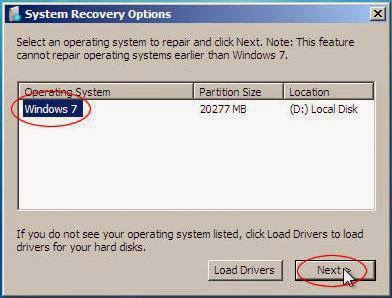
ေအာက္ပံု မွာ ျပ ထား တဲ ့use recover tool ေလး ကိုအမွန္ ေလး ျခစ္ ေပး ျပီး next ကို နိုပ္ေပးပါ။
အဆင္ ့ ( ၅ ) 
-----------------------------
“System Restore” or “System Image Recovery”

Read more at: http://windows7themes.net/en-us/missing-operating-system-windows-7/ © windows7themes.net
“System Restore” or “System Image Recovery”

Read more at: http://windows7themes.net/en-us/missing-operating-system-windows-7/ © windows7themes.net
System Restore” or “System Image Recovery”.

Read more at: http://windows7themes.net/en-us/missing-operating-system-windows-7/ © windows7themes.net
system Restore or system image recovery မလုပ္ပါနဲ ့command prompt ေလး ကို ဖြင္ ့ပါ။
အဆင္ ့ ( ၆ )
----------------------------
command prompt ေလး ထဲ မွာ ေအာက္ က စာ ေတြ ကို ရိုက္ ထည္း ေပး ပါ။ entre ေခါက္ပါ။
chkdsk c: /f/r
/f /r will both fix errors and recover lost data.
/f will only fix errors on your disk
/r will only recover lost data


Read more at: http://windows7themes.net/en-us/missing-operating-system-windows-7/ © windows7themes.net
chkdsk c :/f /r
/f/r
/f
/r
ျပီးရင္ restart ခ် ျပီး ျပန္ သံုး ၾကည္ ့ပါ။ အဆင္ ေျပ သြား ပါ ျပီ။
credit: ko saithu

Friday, September 26, 2014

Blogger နည္းပညာမ်ားစုစည္းရာ**koyangon(myanmar)**

ဘေလာ႕နည္းပညာမ်ားကိုေလ႕လာေနတဲ႕ကၽြန္ေတာ္႕လိုသူငယ္ခ်င္းမ်ားအတြက္ဘေလာ႕နည္းပညာမ်ားကိုရွာလို႕လြယ္ကူေအာင္ဘေလာ႕ခရီးသည္ရဲ႕နည္းပညာမ်ားကိုစုစည္းျပီးတင္ေပးထားပါတယ္။

Related Posts Plugin for WordPress, Blogger...

koyangon

Blogger Tips and TricksLatest Tips And TricksBlogger Tricks

၀ါသနာတူသူငယ္ခ်င္းမ်ား ႏွင့္ ဖတ္ရႈအားေပးၾကေသာ ညီအကိုေမာင္ႏွမ မန္ဘာ၀င္မ်ား

လိုအပ္တဲ့ နည္းပညာ နဲ ့ ေဆာ့၀ဲမ်ိဳးစံုကို ေအာက္ကအကြက္မွာ နာမည္ေရးပီးရွာလိုက္ပါ